Free tool · Runs locally
Know what your Claude Code hours are worth.
A one-file Python dashboard that reads your local Claude Code transcripts and shows where the time went, what the compute was worth at API list prices, and whether Pro, Max, or pay-as-you-go is the right plan for how you actually work. Nothing leaves your machine.
What it measures
Two questions every Claude Code user has.
01 · Where did the hours go?
Active engaged time per project, with idle gaps dropped so the numbers mean something. Sessions, output tokens, a per-model breakdown, and the API list-price value of the compute you consumed. Daily, weekly, and monthly views with click-to-filter charts.
02 · Are you on the right plan?
Your last 30 days of consumption against the Pro, Max 5x, Max 20x, and raw-API stickers, with a keep, upgrade, or downgrade verdict. It also counts the days you actually hit a usage limit: dollars say what a plan is worth, limit days say whether it's enough.
Receipts
Our own last 30 days, measured.
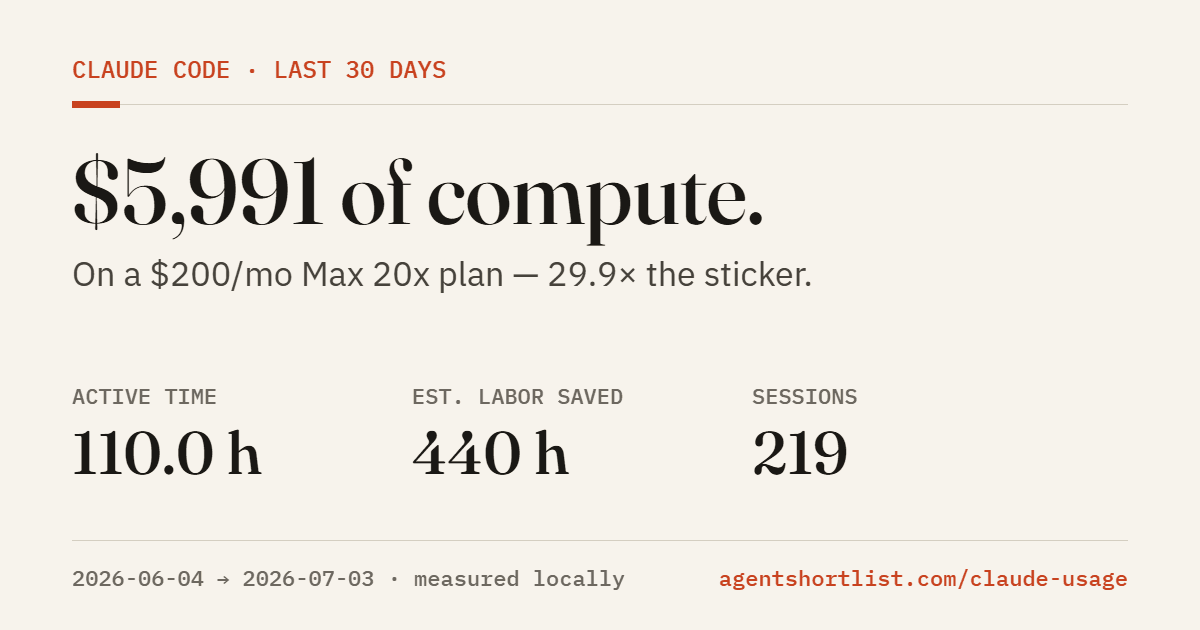
113.7 active hours across 223 sessions. $6,237 of API-equivalent compute on a $100/month Max 5x plan — 62.4 times the sticker price. This is the share card the dashboard generates: totals only, no project names, rendered entirely in your browser.
Run it
Three commands. No install.
git clone https://github.com/lucaspowell8020/claude-code-time-tracker
cd claude-code-time-tracker
python claude_usage.py --open --plan pro
Python 3.9 or newer, standard library only. Swap --plan pro for max_5x, max_20x, or api to match what you pay. It reads ~/.claude/projects, writes one HTML file next to itself, and opens it in your browser. Re-run it any time to refresh; there's no database to maintain.
It's one readable file. Before you run anything from the internet against your transcripts, open the source and check what it does. This one will pass the check: no imports beyond the standard library, no requests, no telemetry.
Weekly digest
Get updates when the tool ships something new
New dashboard features, plan-price changes, and the weekly digest of what moved in agent land. No spam, unsubscribe in one click.
Common questions
What builders ask before they run it.
How do I check my Claude Code usage?
Claude Code already stores everything you need. Every session is written to your machine as a transcript file under ~/.claude/projects. The usage dashboard reads those files and shows active hours by project, sessions, token volume, and the API list-price value of the compute you consumed, in daily, weekly, and monthly views.
The /status command inside Claude Code shows your current limits, but it doesn't show history, per-project breakdowns, or what the usage was worth. That gap is what this tool fills.
Which Claude plan should I be on?
Measure, don't guess. The decision rule the dashboard applies to your real usage: under ~$20/month of API-equivalent consumption, pay-as-you-go API access costs less than Pro. Between roughly $20 and $100/month, Pro is the value pick. Above that, the Max tiers take over.
Dollars are only half the answer. The other half is limits: the dashboard counts the days Claude Code recorded a usage-limit notice. If you hit limits on three or more days in a month, the next tier up pays for itself in unblocked work, whatever the dollar math says. The full tier-by-tier breakdown is in Claude Pro vs Max vs API.
Is Claude Max worth $200 a month?
For daily Claude Code work, usually yes, and the margin is not close. Our own last 30 days of transcripts: $6,237 of API-equivalent compute on the $100/month Max 5x tier. That's 62 times the sticker price. The $200 Max 20x tier is the same math with roughly four times the quota headroom.
The point of the dashboard is that you don't have to take our number on faith. Run it on your own transcripts and see your multiple. If it comes back under 1x, downgrade with a clear conscience.
Does the dashboard send my data anywhere?
No. It's a single Python file with zero dependencies and no network calls. It reads your local transcript files, writes one HTML file next to itself, and stops. No telemetry, no account, no install step. The source is short enough to read before you run it, and we'd encourage exactly that.
The share card it generates contains totals only: hours, sessions, compute value. Project names never leave the local dashboard.
Is there a Claude usage tracker?
Yes — the dashboard on this page is a free Claude usage tracker built for Claude Code. It reads the transcript files Claude Code already writes to ~/.claude/projects and shows daily, weekly, and monthly usage: active hours, sessions, token counts by model, and the API list-price value of the compute you consumed.
Anthropic doesn't ship an official usage tracker for the subscription tiers beyond the /status command inside Claude Code, which shows the current 5-hour window only. If you want history, per-project breakdowns, or a dollar figure attached to your hours, a third-party tracker is the fastest path.
How do I monitor Claude Code token usage?
Every Claude Code session writes token counts into the transcript JSON under ~/.claude/projects. The dashboard reads those counts and rolls them up by day, project, and model, so you can see which project burned Opus at $5/$25 per million tokens versus which one stayed on Haiku at $1/$5.
For real-time monitoring inside a session, the /cost command in Claude Code shows the current session's token totals. The dashboard fills the historical view: cumulative token usage across all your sessions, with model-level splits so you can spot where the routing went wrong.
When does Claude usage reset?
Claude's subscription tiers run on a rolling 5-hour window, not a daily reset. Requests roll out of the window 5 hours after they were made, so the "reset" is continuous rather than a specific clock time. Hit the cap at 10am and the earliest requests expire at 3pm, gradually restoring capacity.
The rolling shape catches most users the first time. Heavy Monday morning use can block Opus by Monday afternoon; the fix is either rate-pacing, routing lower-stakes work to Sonnet or Haiku (which have separate caps), or moving batch work to the API where there is no rolling envelope.
How are the saved-hours estimates calculated?
Two methods, shown side by side so you can judge them. Method A multiplies your active hours by a time factor (default 4x: one focused hour driving Claude roughly equals four done by hand). Method B divides output tokens by a human writing throughput. Method B reads high because Claude emits far more output than the final deliverable, so treat it as a relative signal across projects.
Both factors are editable in a small config file, and the methodology is printed at the bottom of the dashboard. These are estimates and labelled as such; the token counts and API-equivalent dollars underneath them are exact.
Related
Guide
Claude Pro vs Max vs API
The tier-by-tier decision guide the plan check is built on. When each one wins, with the breakeven math.
Guide
How to avoid Claude usage limits
If the dashboard shows limit-hit days, start here before you upgrade. Most limit pain is fixable habits.
Tool
AI Agent Cost Calculator
Per-token math for any workflow you're planning, across 15 models. Pricing re-verified weekly.